
This article provides an overview of available options to a) sign and verify Docker/container images and b) create image attestations. It compares the tools Docker Content Trust, BuildKit attestations, Notation, Cosign, and GitHub attestations. The basic terms and concepts are explained, and it concludes with recommendations for which tool is most suitable per use case.
Docker Image signing and attestation series
This article is part of a multi-part series:
- (This article): Overview: explains concepts and the tool landscape, provides high-level recommendations
- Docker Image Signing with Notation: detailed analysis of the Notation tool and its signatures
- Docker Image Signing and Attestation with Cosign: detailed analysis of Cosign, for image signatures and attestations
- Docker Image Attestation with GitHub Attestations: detailed analysis of GitHub attestations and its pros&cons
- Docker Image Attestations with BuildKit: detailed analysis of BuildKit’s attestations
Introduction
Target audience
This article is for DevOps/Cloud engineers who keep hearing about supply chain security, signing images, and creating attestations. Implementing these aspects is difficult because you need to wrap your head around the topic. This article provides a conceptual understanding and the best tools to sign and verify container images.
Why did I write this article? Because I assume that you have as much trouble as I did when reading existing blog posts. They leave me with more questions than before and often miss the bigger picture. They would just explain, “Run this command to sign, and that command to verify your image,” and leave me hanging regarding how to do this on a large scale, in practice, using automation. Many articles assumed background knowledge I didn’t have, throwing terms at me like “in-toto”, “attestation”, “provenance”, or “SLSA”, with unhelpful explanations.
I’ll begin by defining several terms (such as “signatures” or “attestations”) in my own words. But before I do so, you need to understand why you should care about any of this:
The problem is the “supply chain” of software, which malicious actors can attack in many places. The SLSA website shows a great overview of the supply chain and the points where it can be attacked (note: there are newer SLSA specification versions than the linked/shown v1.0, but I found them more confusing and thus decided to stay with v1.0):
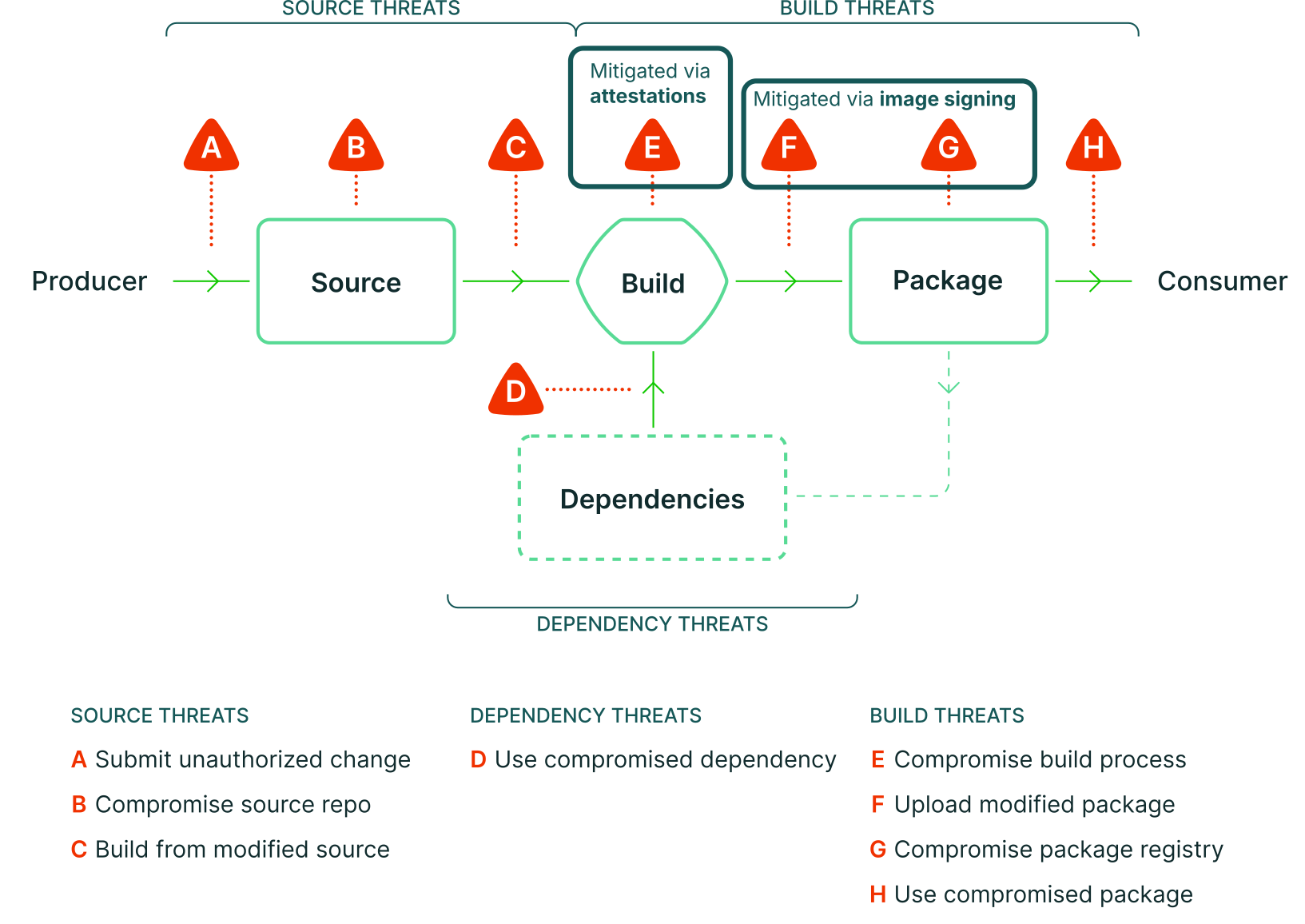
Securing your supply chain means implementing techniques (on the producer and consumer side) to mitigate as many threats as possible.
- Signing images mitigates F+G. Assuming that the consumer configured trust policies, image signatures allow the consumer of a software package to verify that the downloaded software artifact was really built and uploaded by the publisher/producer of the artifact
- Creating attestations (on “clean” ephemeral CI/CD runner machines) mitigates E
Addressing the remaining threats (A, B, C, D, H) requires different approaches that are out of scope for this article!
Terminology
Before we look at concrete tools, I define various terms.
Asymmetric encryption & Digital signatures
Asymmetric encryption is the core mechanism that drives the entire topic of signing or attesting software artifacts. To keep this article short🤦, I’ll assume you have a basic understanding of asymmetric encryption and identities (like, say, SSL does it). See this article to refresh your memory or learn about the details. Here are just a few key facts that you should know:
- Asymmetric encryption (like RSA) uses a public+private key pair (PPK). The public key can be distributed publicly, the private key is kept secure by the one who generated the pair
- Data encrypted with the public key can only be decrypted with the corresponding private key
- The private key owner can sign a piece of information, resulting in a digital signature. Anyone can verify a signature using the public key. Because asymmetric cryptography is computationally expensive, the information you sign is typically small, e.g. the checksum of a file rather than the file’s actual content.
- Public and private keys are just random, meaningless data. To build trust, you want digital identities that come with meaningful, human-readable meta-data, e.g. the name or address of people or organizations. Examples are X.509 certificates that define a file format to encode such digital identities (and include their public key).
- To avoid having to keep track of each publisher’s identity (managing thousands of certificates), there are trust delegation models where you only trust a small number of Certificate Authorities (CA) that issue certificates to the holders of PPKs (these PPK holders retrieve their certificate via a Certificate Signing Request they send to the CA).
In practice, securing the supply chain of a software artifact would include the following steps:
The publisher:
- Creates a PPK pair and certificate (e.g. with the help of a CA)
- Publishes the certificate (which includes your public key) somewhere
- Securely stores the private key, e.g. in a KMS/vault or the secrets management of the CI/CD system
- Signs the concrete artifact with the private key (e.g. the content of a Docker image manifest, or the hash of a binary)
- Publishes the resulting signature in some format (I’ll address the “some format” vagueness soon)
The consumer:
- Determines the concrete artifact that was signed and whose signature should be verified (e.g. by downloading the software artifact and computing its checksum, or resolving a Docker image reference/tag to its SHA256-digest)
- Downloads the signature of that software artifact
- Finds and downloads the correct certificate of the publisher
- Verifies the signature using the publisher’s public key (that is part of the publisher’s certificate)
- If the signature is valid, download/execute the software
Attestation & Provenance
Let’s examine two important concepts, attestation and provenance, and how they are defined in our context (software/technology).
Attestation: most sources I read define attestation as a statement or claim about a specific software artifact. E.g., “Docker image <ref> tagged with v1.0 at <date> was built by the official publisher using their GitHub Actions workflow with URL <url> for commit <commit-hash>”, or “Docker image <ref> tagged with v1.0 at <date> was scanned for vulnerabilities , and it contained none at that time”.
On a technical level, an attestation is usually just a text file (often formatted as JSON) that includes:
- The type of claim (e.g., defined as a URI, e.g.
https://in-toto.io/attestation/vulnsimplying a vulnerability scan) - The claim itself (e.g., as arbitrary JSON)
- The target artifact that the claim applies to (e.g. a manifest of a Docker image, e.g.
ghcr.io/stargz-containers/node@sha256:9f554c9a505...)
Most sources state that an attestation should be (cryptographically) verifiable by the consumer, meaning the publisher must sign it. But there are also sources (e.g., Docker build attestations) that exclude digital signing/verification from the definition, for whatever reason.
Provenance (a.k.a. build provenance) is just one example of an attestation. Conceptually, provenance defines how and when a software artifact was created. The above example (“Docker image <ref> tagged with v1.0 at <date> was built by the official publisher using their GitHub Actions workflow with URL <url> for commit <commit-hash>”) is exactly this. Note that the tool vendors and standards define the concrete contents of a provenance attestation. For instance, should it include details of all used build tools (e.g., their versions and checksums), information about the machine the build ran on, or build logs?
In-toto attestation
Many supply-chain-related tools and websites mention that they use “in-toto attestations”. The in-toto attestation framework solves the problem that you need some kind of standardization for the (JSON) file format a tool uses to specify attestations on a technical level. Without such standards, every attestation/signing tool would have to make up its own proprietary format. This would fragment the ecosystem, preventing interoperability between different tools/vendors. It would also reduce the chance that a tool becomes popular and widely used. Potential consumers of such tools know this (maybe just subconsciously). Thus, it is understandable that various tools often mention “in-toto attestations” because it increases their chances of being used and becoming “the next big thing”.
The in-toto attestation framework defines a hierarchically nested set of file formats (see here). The outermost layer, the Bundle, includes digital signatures and a reference to a set of Statements (where each Statement is wrapped in an Envelope that Base64-serializes the wrapped Statement). A Statement then defines the three elements I discussed above in the “Attestations & provenance” section. In-toto uses the term Predicate for the claim and predefines many predicate types (see here), e.g., a CycloneDX- or SPDX-formatted SBOM, a vulnerability report, or build provenance.
In-toto vs. in-toto attestations
Don’t confuse “in-toto attestations” with “in-toto”. The latter is a larger framework to ensure the overall supply-chain security of a project, including all steps, such as committing, running tests, or building & publishing artifacts. “In-toto attestations” are just a part of “in-toto”.
SLSA
SLSA stands for “Supply-chain Levels for Software Artifacts” and is pronounced “salsa”.
SLSA answers questions like:
- Which concrete things should I sign or attest? Should I just provide (build) provenance and sign my images?
- I want to attest build provenance, but which specific aspects are part of it?
- Are the measures we have already implemented to secure our software supply chain at a good level compared to the overall industry?
SLSA defines an easy-to-understand model that explains possible supply-chain security attacks (see docs) and mitigation options for some of these threats. SLSA guidelines are subdivided into the build track and the source track (see track docs) and discuss three levels (level 3 providing the highest level of supply-chain trustworthiness) for each track. SLSA offers concrete tips for improving security, manually or with specific tools.
When it comes to creating attestations, SLSA endorses the in-toto attestation format. SLSA even refines some of the in-toto specifications, e.g., by defining the build provenance JSON structure (see here) or the verification summary (see here).
Trust Policy
Doing verification in an automated way requires that you configure a “trust policy” (or several) that defines who you trust and possibly other requirements. For instance:
- To verify the authenticity of a signed image, automated verification means that you, the consumer, refuse to deploy container image updates in case the new image’s signature is either invalid or is signed by an unknown signing identity (as a consumer, you manually configure the trusted identity/identities in your trust policies).
- For attestations, automated verification can mean a lot, depending on the degree of standardization of the file formats of the attestations. Two examples:
- Only deploy images with signed vulnerability report attestations where the report generation date is not older than one week, and the report does not contain any CVEs with a CVSS score of “High” or “Critical”.
- Only deploy images that come with signed SBOM attestations (signed by a trusted identity), where the SBOM either does not contain the Log4J library at all, or its version is newer than v2.17, ensuring that the Log4Shell CVE cannot be present in the image.
Tooling
There are several competing tools to sign images and create attestations (some attestations being cryptographically verifiable, some not).
The following table shows an overview of the tools:
| Feature: signing | Feature: attestation | Uses cryptography | Adoption by ecosystem tooling | |
|---|---|---|---|---|
| Docker Content Trust (“Notary V1”) | ✅ Only images | ❌ | ✅ Key/Certificate-based | Connaisseur |
| BuildKit Details | ❌ | ✅ Build provenance & SBOMs only | ❌ Not verifiable! | — |
| Notation Details | ✅ Images & files stored as OCI artifacts | ❌ | ✅ Key/Certificate-based | FluxCD, Kyverno, Ratify, Harbor |
| Cosign Details | ✅ Images & files (local or in OCI registry) | ✅ Attestations of arbitrary types, including build provenance & SBOMs | ✅ Key-based or keyless | FluxCD, Kyverno, Sigstore Policy Controller, Connaisseur, Harbor |
| GitHub attestations (free only for public repos) Details | ❌ | ✅ Attestations of arbitrary types, including build provenance & SBOMs | ✅ Keyless | Kyverno, Sigstore Policy Controller |
One important aspect is automated verification of image signatures. This matters in practice, because running verification commands manually is undesirable. You would have to do this on every update/deployment.
There are two places where this automated verification applies:
- At build time: when you build an image on top of a base image, you’ll want to verify the base image’s signatures! As of Q4/2026, barely any image builder supports that.
- Notable exceptions:
- Podman allows defining trust policies (see spec) for Cosign/Sigstore signatures, which Podman applies in its internal core layer, meaning that both build time (“
podman build ...“) and deploy time (“podman pull ...“, “podman run ...“) are covered by these trust policies. Unfortunately, Red Hat actively ignores the new Cosign bundle format for one year, meaning that Podman cannot verify image signatures created with newer Cosign versions (see open issue). - Docker‘s Buildx build system supports policies (see docs) which supposedly can also verify signatures (docs). Unfortunately, that support is very limited: it only works for images that come with BuildKit-specific attestations that the image creator signed with Cosign afterwards. Many images either don’t come with these BuildKit attestations (e.g., Chainguard images lack them), or the image creator might not have applied Cosign signatures to the BuildKit attestations (but only to the actual images themselves, or they used Notation). See also this issue for details.
- Podman allows defining trust policies (see spec) for Cosign/Sigstore signatures, which Podman applies in its internal core layer, meaning that both build time (“
- Possible workarounds:
- Running commands like “
cosign verify ...” in your CI pipeline before running your build. You have to make sure that the verified base image SHA256-digest used in the verification command matches the digest loaded by the builder. - If you use
Dockerfile, you can create a multi-stage build where you declare the (SHA256-pinned) base image in a buildARGand add a helper stage at the top that installs the verification tool (e.g.,cosignCLI) and verifies the image of the buildARGwith it. Then you need to make your existing build stage depend on this helper stage, e.g., by copying some (empty dummy) file from the helper stage to your build stage. You can see an example for Cosign and Notation here. - If your build engine offers a plug-in mechanism, you could write a custom verifier plug-in. For example, you could extend the
dockerCLI with a new plug-in that offers a newverify-and-buildcommand that first verifies the base image signatures (according to a policy language of your choice), then builds the image. Interestingly, I did not find any such plugins in the wild.
- Running commands like “
- Notable exceptions:
- At deploy time:
- The Adoption by ecosystem tooling column of the above table indicates which third-party (open source) tools automatically verify signatures in Kubernetes. Most of these tools are Kubernetes operators that block image deployments if the referenced image does not conform to your configured trust policy.
- Podman‘s trust policies (explained above in the “build time” section) also apply at deploy time
- Docker (desktop) does not support image signature verification at deploy-time
- Containerd supports image verification via a simple plugin mechanism (docs) which calls a Linux binary of your choice. However, there don’t seem to be any established plugin implementations! If you use
nerdctlto run containers with containerd,nerdctlalso supports a (separate) client-side image verification for Cosign (docs) and Notation (docs).
To shorten this article, I moved the detailed analysis of BuildKit, Notation, Cosign, and GitHub into separate articles, linked in the above table. I only discuss Docker Content Trust next.
Docker Content Trust
Docker Content Trust (DCT), a.k.a. “Notary V1”, was an older approach developed by Docker in 2015. It uses keys/certificates. With DCT, signatures are not stored in the image registry that hosts the corresponding image but on a separate server, the Docker Notary Server. However, DCT is now (officially) dead, see this post. You shouldn’t use it anymore.
State of signing/attestations in the cloud-native ecosystem
When choosing a tool, I ask myself these questions:
- Ease of use, both for creating signatures/attestations for my images and for allowing (me or others) to verify them?
- Adoption: which existing “off-the-shelf” images already have signatures/attestations, and built by which tools?
My personal tool selection strategy derived from the answers to these questions is:
“Use the tools everyone else is using (follow the adoption), and if in doubt, prefer those that are easy to use”.
Adoption analysis
A brief look at the adoption (by off-the-shelf images) yields this:
- BuildKit attestations:
- Build provenance attestations are automatically enabled in any public GitHub repo that uses Docker’s build-push-action. I reckon that many GitHub projects that build images use this action on GitHub.
- Most Official Docker images provide either SBOM attestations or build provenance attestations, sometimes both. I was unable to figure out why this is such a “mixed bag”.
- Notation: I only found that Bitnami signs their images with Notation; see the announcement (which includes verification instructions). Note that Bitnami’s images are now paid. Also, Microsoft seems to sign all images it pushes to mcr.microsoft.com. See here for an example of verification instructions, which you can generalize so that they apply not just to Java but to any MCR image. A code search on GitHub.com yields just a handful of results. I suspect that Notation is more prevalent in (private) Enterprises.
- GHA attestations: a code search on GitHub.com yields almost 20k hits where people use the GitHub action
actions/attest(or the legacyactions/attest-build-provenanceaction) to sign their images - Cosign: a code search on GitHub yields about 50k hits
From looking at the numbers, I’d argue that Cosign has won the adoption race.
Ease of use analysis
Regarding ease of use, Cosign (with its keyless signing mode) is by far the easiest approach, because neither the producer nor the consumer needs to handle signing keys. Cosign currently also provides the best verification tooling support for image consumers. Consumers only need to configure the trust policy, which is essentially a list of tuples of the form(<image-ref>, <issuer URL>, <subject-name>), e.g. ("ghcr.io/kedacore/**", "https://token.actions.githubusercontent.com", "https://github\.com/kedacore/keda/\.github/workflows/release-build\.yml@refs/tags/v.*"). See Chainguard’s policy catalog for more examples.
Conclusion
The topic of signatures and attestations is confusing to newcomers. There are many (incompatible) implementations/standards, and you need to learn a lot of hard-to-distinguish terminology/jargon.
You will probably wonder: “Which tools for signing/attesting should I use?” Having analyzed the existing tools and their adoption, this is my recommendation:
- Container image signing and attestations are most easily done using Cosign, especially if you work out in the open (e.g. publicly publish your images). See this separate article that discusses Cosign in detail.
- If you are in a corporate/enterprise setting (where you build non-public images and deploy them in your infrastructure), you might not want signing-related entries to appear in a public log such as the Rekor logs used by Cosign. In this case, use approaches that use certificates/keys instead. Cosign can be configured to do so. You can also use Notation (see separate article).
- Attesting files/binaries you release on GitHub is most easily done using GitHub attestations (discussed in this article).
My personal opinion and hope is that, in the future, build provenance attestations will replace regular signatures. After all, build attestations (as created by, e.g., Cosign) are already cryptographically verifiable anyway, and they provide more information to the consumer than a signature alone (the signature merely tells you who did the build, while build provenance, in addition, provides further details about the build).
Finally, there is the issue of what you should do about all the upstream third-party open-source images you use (e.g., images you run, or use as a base image): I suggest you manually check every third-party image regarding which signatures (from which tool) it provides (and how you can automatically verify it). If an image doesn’t have any signatures, there are several options (with increasing amounts of effort):
- Offer a Pull Request to the open source project to add Cosign signatures. This is typically just a few lines of GitHub Actions YAML code (note: this won’t work for Docker Official Images!)
- Research alternative hardened, minimal images, e.g., Chainguard / Rapidfort / Bitnami, and more (see also this article) which usually come with signatures and SBOM attestations and fewer vulnerabilities, but do cost money.
- Copy and re-sign images that you deem trustworthy. For example, pull an image from a trustworthy source (even if it lacks signatures, or if it uses Signatures you cannot automatically verify in your deployment environment), copy the image to your own registry, and then re-sign it with Cosign.
What about Helm charts?
Helm charts are probably the most-used “installer format” for deploying images to Kubernetes.
Signed Helm charts are not common in practice. I only found DHI to sign their charts. Personally, I won’t sign my charts. Instead, I apply the following approach:
- When adopting a new chart, I manually inspect its code. This helps me understand how it works.
- On each chart version update, I diff the chart’s source code, because Helm chart updates tend to break my deployments in subtle ways. For instance, if the maintainer changed the upstream
values.yamlstructure, my value overrides no longer work as expected. A manual review helps me catch such issues early on.
I hope this overview article was helpful. To learn more about the different implementations, check out the other articles in this series.